Любой шаблон HTML с разделом блога -> Функционирующий блог
В этом уроке мы превратим любой сайт шаблона HTML, который вы можете купить у themeforest, в функционирующую систему блогов на основе laravel. Это не учебник для начинающих, поэтому я не буду объяснять каждую строку кода. Мой предыдущий учебник предназначен для начинающих. (Дайте мне немного, и я все организую, обещаю).
Обзор проекта:
- Мы будем использовать один шаблон администратора и один шаблон общего представления. Шаблон администратора называется CoreUI Bootstrap. Вы можете скачать это здесь. https://coreui.io/product/free-bootstrap-admin-template/
- Бесплатный шаблон HTML называется MegaKit. Это совершенно бесплатно. Вы можете использовать этот шаблон для этого руководства или предварительно разработанный HTML-сайт по вашему выбору.
https://themewagon.com/themes/free-bootstrap-4-html-5-business-website-template-megakit/
- Вот UML-диаграмма
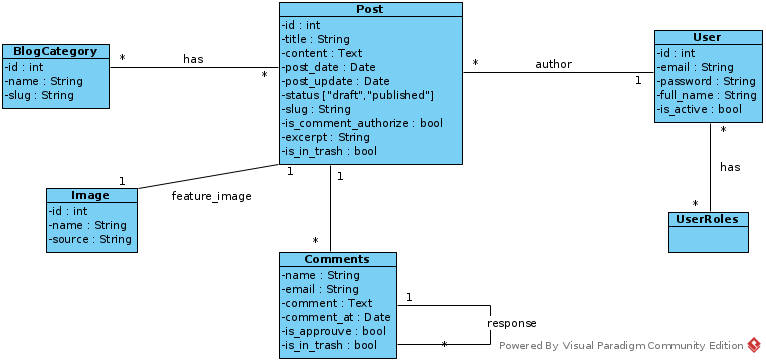
2. Создайте проект Laravel
composer create-project laravel/laravel blog
3. Откройте каталог блога с помощью редактора кода и терминала. Затем создайте Post Model и Controller
php artisan make:model Post -m -c

4. Это файл после миграции
<?php
use Illuminate\Database\Migrations\Migration;
use Illuminate\Database\Schema\Blueprint;
use Illuminate\Support\Facades\Schema;
return new class extends Migration
{
 public function up()
 {
 Schema::create(‘posts’, function (Blueprint $table) {
 $table->id();
 $table->string(‘title’);
 $table->text(‘content’)->default(“”);
 $table->enum(‘status’, [‘draft’, ‘published’])->default(‘draft’);
 $table->string(‘slug’)->unique();
 $table->boolean(‘is_comment_authorize’)->default(false);
 $table->string(‘excerpt’)->default(“”);
 $table->boolean(‘is_in_trash’)->default(false);
 $table->timestamps();
 $table->foreignId(‘user_id’)->constrained(‘users’)->cascadeOnUpdate()->cascadeOnDelete();
 });
 }
public function down()
 {
 Schema::dropIfExists(‘posts’);
 }
};
6. Создайте модель комментария и контроллер
php artisan make:model Comment -m -c

7. Создайте файл переноса таблицы комментариев:
<?php
use Illuminate\Database\Migrations\Migration;
use Illuminate\Database\Schema\Blueprint;
use Illuminate\Support\Facades\Schema;
return new class extends Migration
{
 public function up()
 {
 Schema::create(‘comments’, function (Blueprint $table) {
 $table->id();
 $table->string(‘name’);
 $table->string(‘email’);
 $table->text(‘comment’);
 $table->boolean(‘is_approved’)->default(false);
 $table->boolean(‘is_in_trash’)->default(false);
 $table->foreignId(‘post_id’)->constrained(‘posts’)->cascadeOnUpdate()->cascadeOnDelete();
 $table->timestamps();
 });
 }
 public function down()
 {
 Schema::dropIfExists(‘comments’);
 }
};
?>
8. Создайте модель изображения и контроллер:
php artisan make:model Image -m -c
9. Создайте файлы миграции изображений
<?php
use Illuminate\Database\Migrations\Migration;
use Illuminate\Database\Schema\Blueprint;
use Illuminate\Support\Facades\Schema;
return new class extends Migration
{
 /**
 * Run the migrations.
 *
 * @return void
 */
 public function up()
 {
 Schema::create(‘images’, function (Blueprint $table) {
 $table->id();
 $table->string(‘path’);
 $table->foreignId(‘post_id’)->constrained(‘posts’)->cascadeOnUpdate()->cascadeOnDelete();
 $table->timestamps();
 });
 }
/**
 * Reverse the migrations.
 *
 * @return void
 */
 public function down()
 {
 Schema::dropIfExists(‘images’);
 }
};
10. Создайте модель и контроллер BlogCategory
php artisan make:model BlogCategory -m -c
11. Создайте файл миграции BlogCategory:
<?php
use Illuminate\Database\Migrations\Migration;
use Illuminate\Database\Schema\Blueprint;
use Illuminate\Support\Facades\Schema;
return new class extends Migration
{
 /**
 * Run the migrations.
 *
 * @return void
 */
 public function up()
 {
 Schema::create(‘blog_categories’, function (Blueprint $table) {
 $table->id();
 $table->string(‘name’);
 $table->string(‘desc’);
 $table->string(‘slug’);
 $table->timestamps();
 });
 }
/**
 * Reverse the migrations.
 *
 * @return void
 */
 public function down()
 {
 Schema::dropIfExists(‘blog_categories’);
 }
};
12. Связь между постом и категорией
Поскольку связь между публикацией и категорией представляет собой отношения «многие ко многим», мы должны создать миграцию для промежуточной таблицы без модели и контроллера.
php artisan make:миграция create_blog_category__posts_table
13. Миграция blog_category__posts_table
<?php
use Illuminate\Database\Migrations\Migration;
use Illuminate\Database\Schema\Blueprint;
use Illuminate\Support\Facades\Schema;
return new class extends Migration
{
 /**
 * Run the migrations.
 *
 * @return void
 */
 public function up()
 {
 Schema::create(‘blog_category__posts’, function (Blueprint $table) {
 $table->timestamps();
 $table->integer(‘post_id’)->unsigned();
 $table->integer(‘blog_id’)->unsigned();
 });
 }
/**
 * Reverse the migrations.
 *
 * @return void
 */
 public function down()
 {
 Schema::dropIfExists(‘blog_category__posts’);
 }
};
Модель публикации (приложение/Модели/Публикация)
<?php
namespace App\Models;
use Illuminate\Database\Eloquent\Factories\HasFactory;
use Illuminate\Database\Eloquent\Model;
use App\Models\Image;
use App\Models\User;
use App\Models\Comment;
use App\Models\BlogCategory;
class Post extends Model
{
 use HasFactory;
 protected $fillable=[
 ‘title’,’content’,’post_date’,’post_update’,’status’,’slug’,’is_comment_authorize’,’excerpt’,’is_in_trash’, ‘user_id’
 ];
public function feature_image()
 {
 return $this->hasOne(Image::class);
 }
public function comments()
 {
 return $this->hasMany(Comment::class);
 }
public function post()
 {
 return $this->belongsTo(User::class);
 }
public function BlogCategory()
 {
 return $this->belongToMany(BlogCategory::class);
 }
public function author() {
 return $this->belongsTo(User::class, ‘user_id’);
 }
}
Модель BlogCategory
<?php
namespace App\Models;
use Illuminate\Database\Eloquent\Factories\HasFactory;
use Illuminate\Database\Eloquent\Model;
use App\Models\Post;
class BlogCategory extends Model
{
 use HasFactory;
 protected $fillable=[
 ‘name’,’desc’,’slug’
 ];
public function Post(){
 return $this->belongToMany(Post::class);
 }
}
Модель пользователя
<?php
namespace App\Models;
// use Illuminate\Contracts\Auth\MustVerifyEmail;
use Illuminate\Database\Eloquent\Factories\HasFactory;
use Illuminate\Foundation\Auth\User as Authenticatable;
use Illuminate\Notifications\Notifiable;
use Laravel\Sanctum\HasApiTokens;
use App\Models\Post;
class User extends Authenticatable
{
 use HasApiTokens, HasFactory, Notifiable;
/**
 * The attributes that are mass assignable.
 *
 * @var array<int, string>
 */
 protected $fillable = [
 ‘name’,
 ‘email’,
 ‘password’,
 ];
/**
 * The attributes that should be hidden for serialization.
 *
 * @var array<int, string>
 */
 protected $hidden = [
 ‘password’,
 ‘remember_token’,
 ];
/**
 * The attributes that should be cast.
 *
 * @var array<string, string>
 */
 protected $casts = [
 ‘email_verified_at’ => ‘datetime’,
 ];
public function post() {
 return $this->hasMany(Post::class);
 }
}
Модель изображения
<?php
namespace App\Models;
use Illuminate\Database\Eloquent\Factories\HasFactory;
use Illuminate\Database\Eloquent\Model;
use App\Models\Post;
class Image extends Model
{
 use HasFactory;
protected $fillable = [
 ‘path’, ‘post_id’
 ];
public function feature_image()
 {
 return $this->belongTo(Post::class);
 }
}
Модель комментариев
<?php
namespace App\Models;
use Illuminate\Database\Eloquent\Factories\HasFactory;
use Illuminate\Database\Eloquent\Model;
use App\Models\Post;
class Comment extends Model
{
 use HasFactory;
 protected $fillable=[
 ‘name’,’email’,’comment’,’comment_at’,’is_approuve’,’is_in_trash’,’post_id’
 ];
public function comments() {
 return $this->belongsTo(Post::class);
 }
}
Напоминание для себя: добавьте пояснения к коду позже для читателей.
